Projects

Case studies showcasing how I approach product challenges—from problem definition through measurable outcomes.

Adobe Substance 3D Automation Service

Enterprise 3D automation SaaS for virtual photography at scale

Sr. Product Manager, Web & Cloud

Enterprise SaaS3D AutomationAPI PlatformAdobe

Introduction

During my tenure as Senior Product Manager at Adobe, I led the product strategy and development of the Substance 3D Automation Service—a cloud-based platform enabling enterprise companies to automate 3D asset processing and generate marketing content at scale through virtual photography.

Problem Overview

Enterprise creative teams faced an exploding demand for content across channels, markets, and formats while budgets and resources remained flat. Creative professionals were spending the majority of their time on repetitive, non-creative tasks instead of high-value creative work.

  • 74% of creative professionals spend over 50% of their time on repetitive, non-creative tasks
  • Creative teams spend less than 30% of their time on actual creative processes
  • Growing needs from brands for dynamic content and personalized experiences
  • Creative teams, tools, and workflows are siloed and fragmented
  • Need to scale content production across changing teams and environments

Objectives

  • Maximize production capacity of enterprise creative teams by automating repetitive tasks
  • Enable content production and delivery velocity at scale using 3D assets
  • Reduce content production errors and improve quality consistency
  • Provide both a web application for creative professionals and APIs for developer integration
  • Deliver enterprise-grade security, reliability, and scalability

Approach

I assembled a cross-functional team and worked closely with engineering, design, and enterprise customers to define the product vision and roadmap. We followed agile methodologies with regular sprint reviews and stakeholder alignment.

  1. 1.Conducted extensive user research with enterprise creative teams to understand pain points and workflows
  2. 2.Partnered with engineering leads to evaluate technical feasibility of 3D automation at cloud scale
  3. 3.Prioritized features based on user impact, technical complexity, and business value
  4. 4.Developed both a web application interface and REST API to serve different user personas
  5. 5.Iterated on the solution through beta programs with key enterprise customers
  6. 6.Collaborated with marketing and sales to define go-to-market strategy

Solution

We built the 3D Cloud Automation Service—a SaaS platform that transforms existing 3D assets into multiple variations for design and production needs. The service offers both an intuitive web application for creative professionals and robust REST APIs for developer integration.

Product Screenshots:
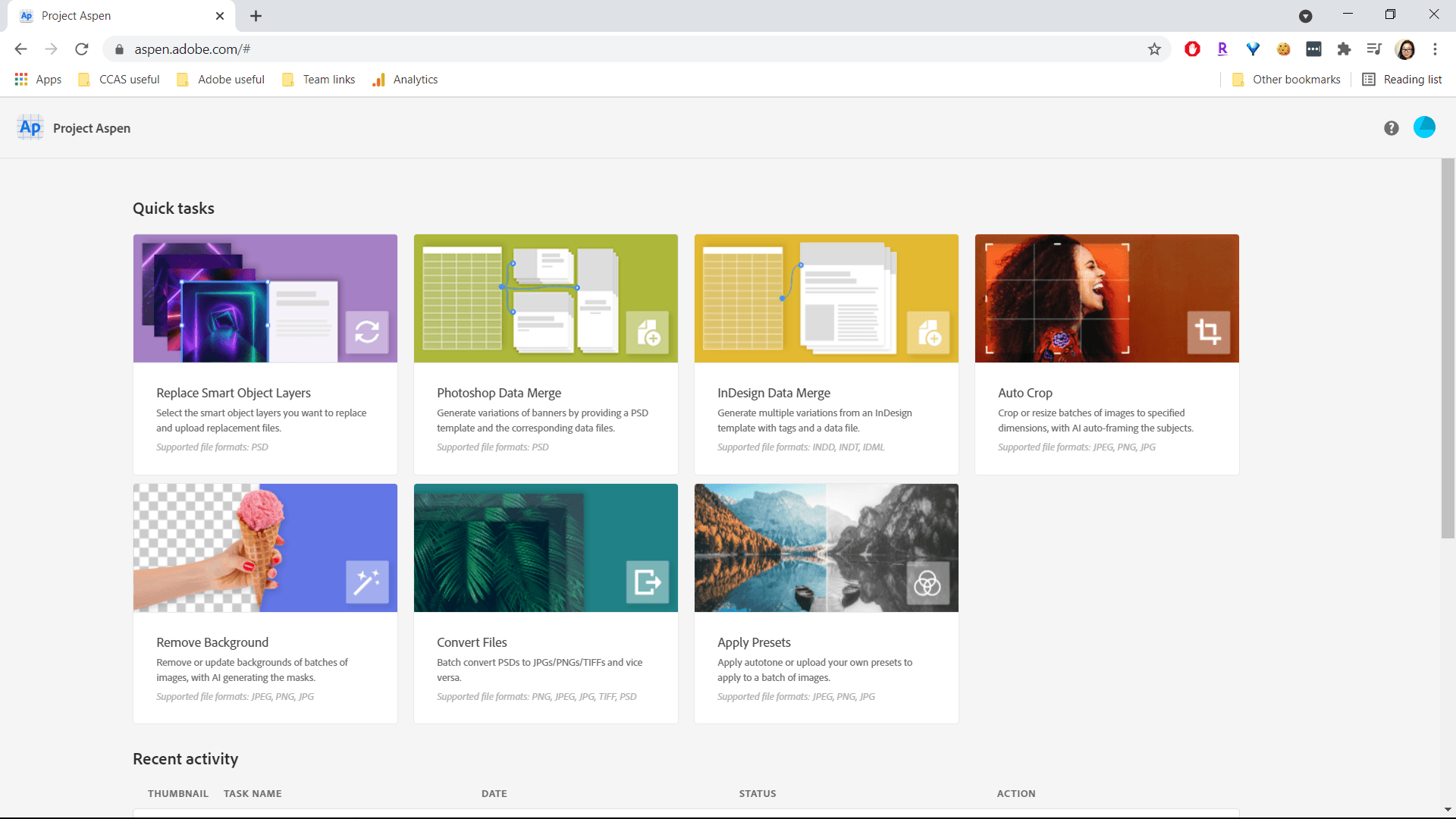
Creative Cloud Automation Services web application interface
Web Application Interface - Quick tasks for automation workflows
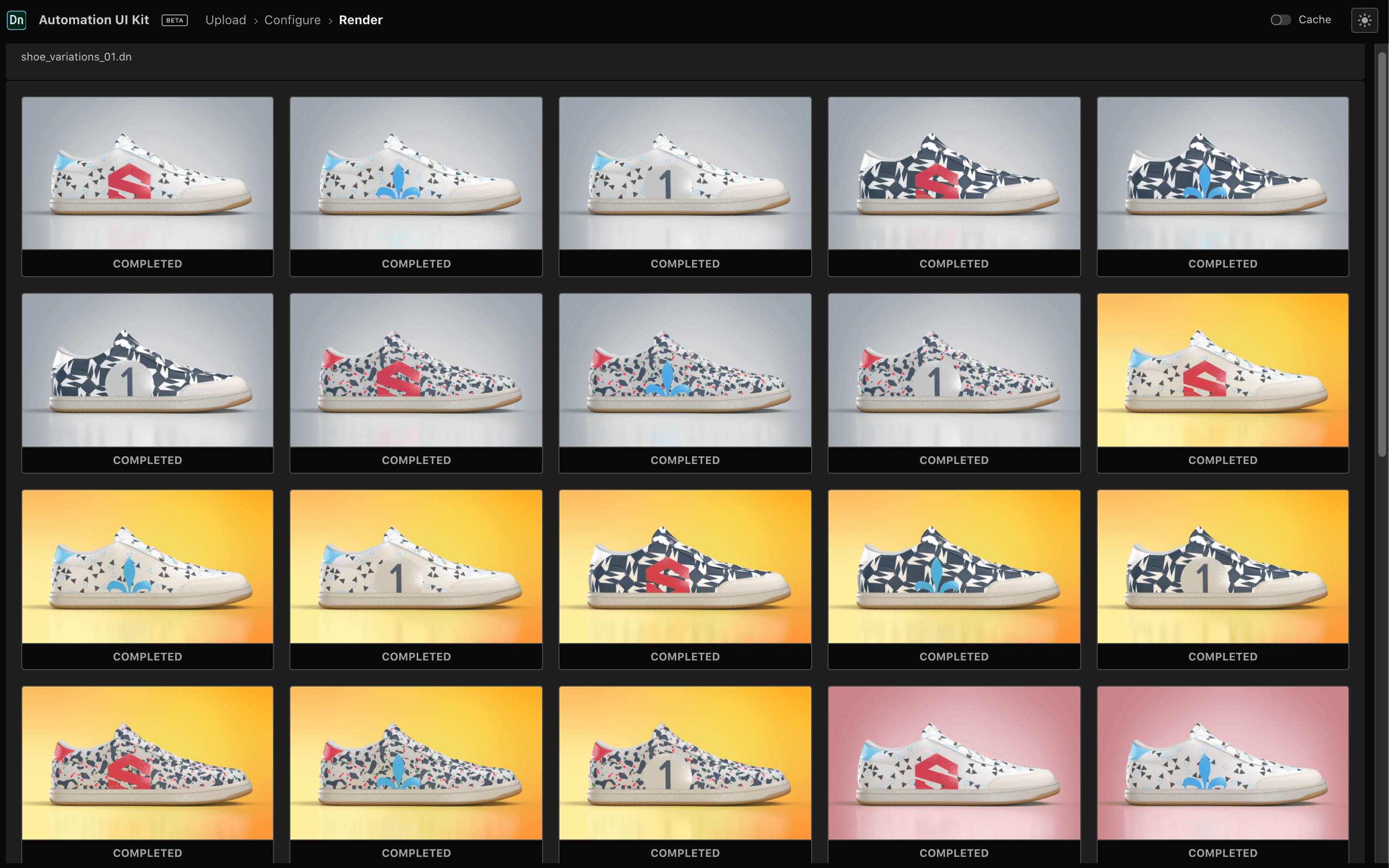
3D Automation showing shoe product variations
3D Automation UI - Generating multiple product variations at scale

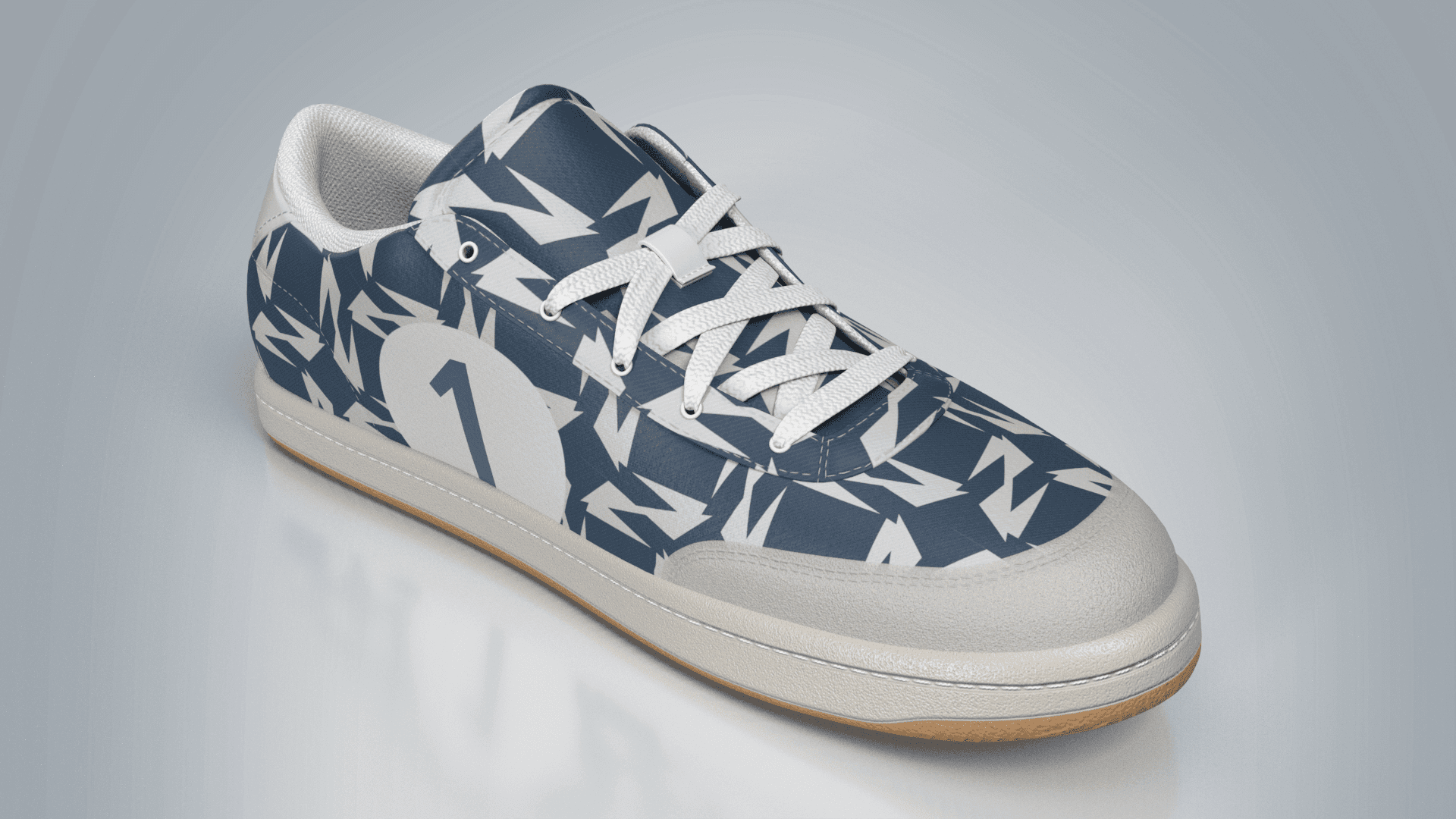
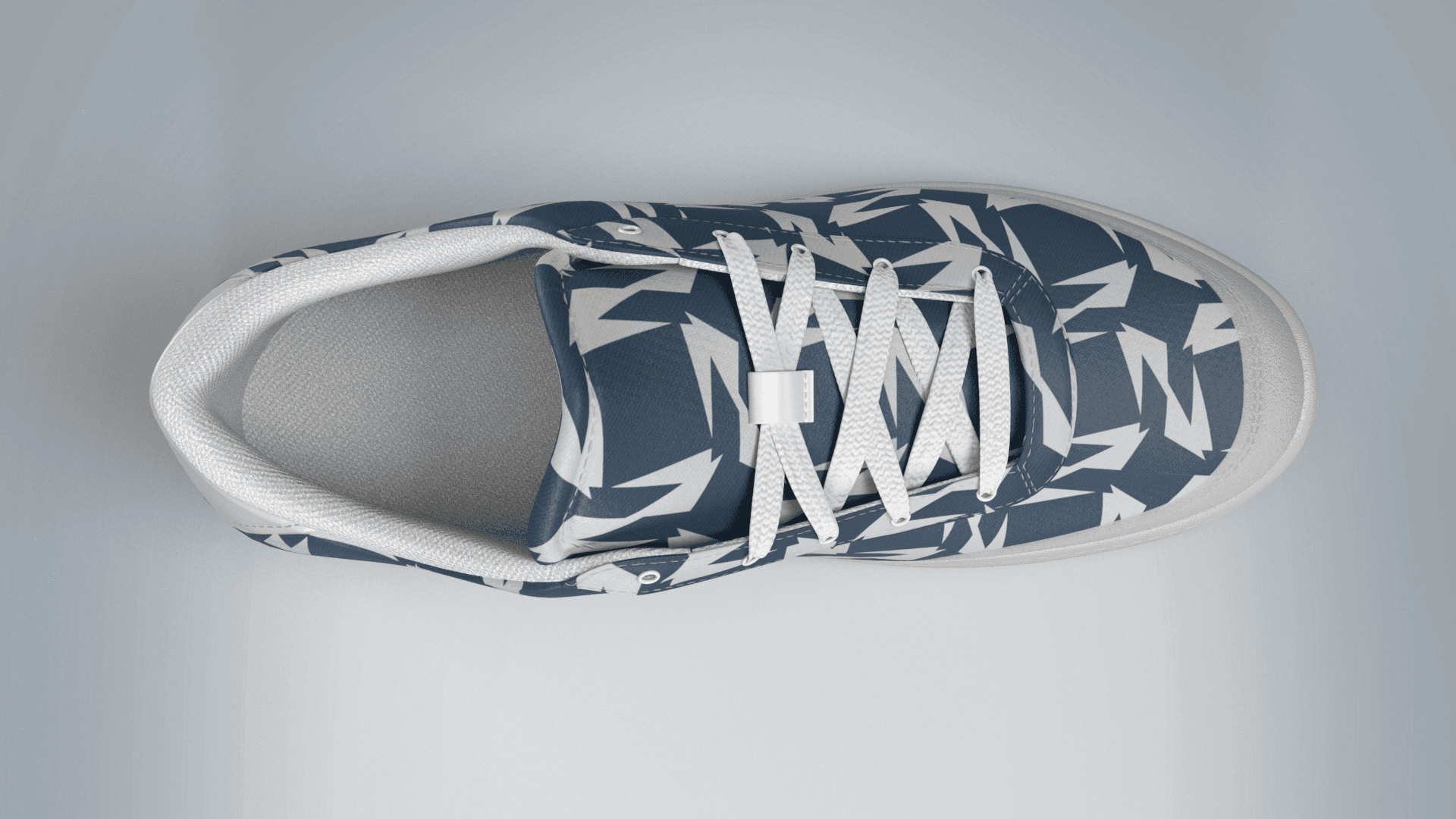
3D Rendered Assets - Multiple Camera Angles:

3D rendered shoe - side view
3D Rendered Asset - Side View
3D rendered shoe - angle view
3D Rendered Asset - 3/4 Angle View
3D rendered shoe - top view
3D Rendered Asset - Top View (Multiple camera angles)

Key Features:

  • Replace 2D backgrounds, materials, textures, and colors programmatically
  • Swap decals and objects within 3D scenes
  • Render multiple camera angles automatically
  • Export to various 3D file formats and web-ready 2D imagery
  • Pre-configured 3D asset and scene manipulations
  • Cloud-based orchestration with dynamic scaling and job management
  • Adobe Content Platform integration for secure storage
  • Enterprise-grade security and data privacy

Challenges Faced

  • Balancing powerful automation capabilities with an intuitive, easy-to-use interface for non-technical users
  • Ensuring seamless integration with existing enterprise workflows and legacy systems
  • Managing cloud infrastructure costs while providing fair share of compute resources
  • Coordinating across multiple Adobe product teams for Creative Cloud integration
  • Educating the market on the value of 3D automation and virtual photography

Outcomes & Impact

1,135+

Production Hours Saved

141%

Increase in Production Capacity

3.5-5x

Reduction in Content Errors

  • Positive feedback from enterprise customers including major CPG and retail brands
  • Successful integration with Adobe Creative Cloud ecosystem
  • Enabled customers to reduce costs and environmental impact through virtual photography
  • Platform adopted for E-commerce and marketing use cases across multiple industries

Key Learnings

  • 💡Enterprise B2B products require both self-serve (web app) and developer (API) access points to maximize adoption
  • 💡Continuous user feedback from beta customers is crucial for validating product-market fit
  • 💡Cross-functional collaboration with engineering, design, and GTM teams accelerates time to value
  • 💡Balancing feature depth with usability is critical for products serving both technical and non-technical users
  • 💡Clear documentation and developer experience are as important as the core product functionality

Conclusion

The Substance 3D Automation Service successfully addressed the content velocity challenge faced by enterprise creative teams. By automating repetitive 3D asset processing tasks, we enabled customers to focus on creative decisions while dramatically increasing their production capacity. The project reinforced my expertise in enterprise SaaS product management, API platform development, and cross-functional leadership.

View Project

Creative Cloud Asset Management Enhancement

Streamlining asset organization and retrieval for creative professionals

Product Manager

UX EnhancementAsset ManagementAdobe

Introduction

I led a project focused on enhancing the user experience for Adobe Creative Cloud's asset management system, with the goal of streamlining asset organization and retrieval for creative professionals to increase productivity and user satisfaction.

Problem Overview

Feedback collected through user interviews and support channels indicated that customers struggled with managing large volumes of creative assets efficiently within the Creative Cloud environment.

  • Users spending excessive time searching for assets across projects
  • Inconsistent tagging and categorization across team workflows
  • Difficulty finding assets as library sizes grew over time
  • Limited search capabilities for complex queries
  • Poor discoverability of organizational features

Objectives

  • Reduce the time users spend searching for assets by 30%
  • Increase engagement with Creative Cloud organizational tools
  • Deliver a scalable solution adaptable across multiple Adobe products

Approach

I assembled a cross-functional team comprising UX designers, engineers, data analysts, and customer success managers. Through agile methodologies, we prioritized features based on user impact and technical feasibility.

  1. 1.Conducted user research to understand asset management pain points
  2. 2.Analyzed usage data to identify high-friction areas in the workflow
  3. 3.Collaborated with UX to design improved tagging, search, and categorization features
  4. 4.Implemented iterative testing with beta users
  5. 5.Regular sprint reviews and stakeholder meetings ensured alignment

Solution

We introduced improved tagging, search, and categorization features within the Creative Cloud environment, balancing advanced capabilities with a simple, intuitive interface.

Key Features:

  • Enhanced search with filters and smart suggestions
  • Improved tagging system with auto-suggestions
  • Better categorization and folder organization
  • Cross-product asset accessibility
  • Performance optimizations for large libraries

Challenges Faced

  • Balancing advanced search capabilities with maintaining a simple, intuitive interface
  • Integrating new features with legacy systems without disrupting existing users
  • Ensuring consistent experience across multiple Adobe products

Outcomes & Impact

35%

Reduction in Search Time

40%+

Increase in Feature Engagement

Significant

User Satisfaction Improvement

  • Positive user feedback in post-launch surveys
  • Scalable architecture enabled rollout across other Adobe products
  • Reduced support tickets related to asset management

Key Learnings

  • 💡Continuous user feedback is crucial for identifying pain points and validating solutions
  • 💡Cross-functional collaboration accelerates problem-solving and innovation
  • 💡Agile processes help manage complexity and adapt to changing requirements

Conclusion

This project improved the Creative Cloud experience for end users while strengthening my skills in stakeholder management, agile product development, and data-driven decision-making. The success reinforced the value of customer-centric design and effective team collaboration.

View Project
aws

Migrating Legacy Enterprise Databases to AWS Aurora

Enabling high availability and scalability for financial services data

Sr. Technical Product Manager

Cloud MigrationAWS AuroraData InfrastructureFinancial Services

Introduction

As a Sr. Technical Product Manager at AWS, I led the end-to-end migration of legacy enterprise databases to Amazon Aurora for a large financial services client. The project demanded careful orchestration across engineering, security, and compliance teams to modernize critical data infrastructure while maintaining near-zero downtime and strict regulatory adherence.

Problem Overview

The client, a large financial services firm, struggled with slow performance and frequent downtime due to aging on-premise SQL databases. As transaction volumes grew, these legacy systems became increasingly unreliable, leading to missed SLAs and dissatisfied customers.

  • Aging on-premise databases causing frequent downtime and degraded performance
  • Growing transaction volumes exceeding legacy system capacity
  • Missed SLAs and declining customer satisfaction due to system unreliability
  • Complex schema conversions too error-prone and time-consuming for manual processes
  • Strict regulatory compliance and data privacy constraints in financial services
  • Petabyte-scale data with hundreds of tables and millions of daily transactions

Objectives

  • Migrate legacy MySQL/PostgreSQL databases to Aurora with near-zero downtime
  • Improve system uptime and query performance to meet stringent SLAs
  • Ensure full regulatory compliance and data integrity throughout migration
  • Leverage AI-driven automation for schema conversion, anomaly detection, and performance tuning
  • Establish a scalable architecture supporting future growth in transaction volume

Approach

We followed a phased migration strategy, balancing speed against risk to minimize business disruption. Each stage was informed by deep stakeholder engagement, rigorous data assessment, and deliberate architectural decisions.

  1. 1.Conducted a comprehensive inventory of all legacy databases and engaged stakeholders to clarify business-critical requirements
  2. 2.Assessed data sensitivity, dependencies, and transformation needs—prioritizing data integrity and auditability
  3. 3.Selected AWS Aurora for its MySQL/PostgreSQL compatibility, built-in scalability, and automated failover
  4. 4.Balanced migration speed against risk, opting for phased cutover to minimize disruption
  5. 5.Chose managed services over self-hosted solutions for operational simplicity
  6. 6.Implemented AI-powered anomaly detection tools alongside AWS DMS for real-time validation

Solution

We designed and implemented a multi-stage migration pipeline leveraging AWS Database Migration Service (DMS) and AI-powered anomaly detection tools. The architecture featured Aurora clusters with read replicas for horizontal scaling, automated backup policies, and real-time replication with schema validation and post-migration performance optimization.

Key Features:

  • Multi-stage migration pipeline with AWS DMS
  • AI-powered anomaly detection during migration
  • Aurora clusters with read replicas for horizontal scaling
  • Automated backup and failover policies
  • Real-time data replication and schema validation
  • Post-migration performance optimization
  • Encryption and audit trails for regulatory compliance
  • Blue/green deployments for zero-downtime cutover

Challenges Faced

  • Maintaining near-zero downtime during migration of petabyte-scale data with millions of daily transactions
  • Navigating strict regulatory compliance and data privacy constraints in financial services
  • Managing complex schema conversions across hundreds of tables with interdependencies
  • Balancing migration speed against risk of data loss or corruption
  • Coordinating across engineering, security, compliance, and business stakeholders

Outcomes & Impact

99.99%

System Uptime

40%

Query Latency Reduction

80%

Manual Intervention Reduction

  • Improved from 97% to 99.99% system uptime post-migration
  • Automated monitoring enabled faster incident response and proactive maintenance
  • Higher customer satisfaction and improved compliance with industry standards
  • Audit trails and encryption meeting financial services regulatory requirements

Key Learnings

  • 💡Phased migration strategies are essential for minimizing business disruption at enterprise scale
  • 💡AI-driven automation can dramatically reduce error rates in complex schema conversions
  • 💡Early and continuous stakeholder engagement is critical when navigating compliance-heavy environments
  • 💡Investing in automated monitoring and rollback strategies pays dividends in risk mitigation
  • 💡Future enhancements could include predictive analytics for capacity planning and AI-driven threat detection

Conclusion

This migration program successfully modernized a critical financial services data infrastructure, transforming unreliable legacy systems into a high-availability, scalable Aurora architecture. The project reinforced my expertise in large-scale cloud migrations, AI-augmented data operations, and cross-functional leadership in compliance-sensitive environments.

Side Projects

Personal explorations in AI, developer tools, and emerging technologies.

Side Project

Figma MCP Server

Design

View on GitHub

A Model Context Protocol (MCP) server Actor hosted on Apify that enables AI assistants and applications to interact with Figma designs and projects using natural language commands. This Actor creates a secure bridge between AI models and the Figma API, allowing users to query design information, extract asset details, modify design elements, and retrieve project metadata without manually navigating the Figma interface.

Model Context ProtocolAPIsAgentic WorkflowsBackend DevelopmentAI AssistantsProduct Design

How It Works

The server acts as an intelligent bridge between AI assistants and the Figma API, translating natural language into structured API calls.

1

AI Assistant sends natural language commands (e.g., "Get all frames from project X")

2

MCP Server translates commands to Figma API calls & handles authentication

3

Figma API returns design data, assets, and metadata

4

MCP Server formats responses and returns structured data to AI

Query Operations

  • List projects & files
  • Get frame details
  • Extract components
  • Retrieve design tokens

Export Operations

  • Export assets (PNG/SVG)
  • Generate thumbnails
  • Extract styles
  • Get version info

Modification Operations

  • Update file properties
  • Modify project settings
  • Add comments
  • Create webhooks

Interested in learning more about any of these projects?

Get in Touch